Showing posts with label myuttyler. Show all posts

Thursday, February 27, 2014

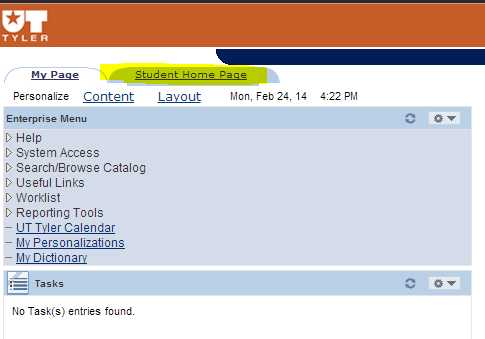
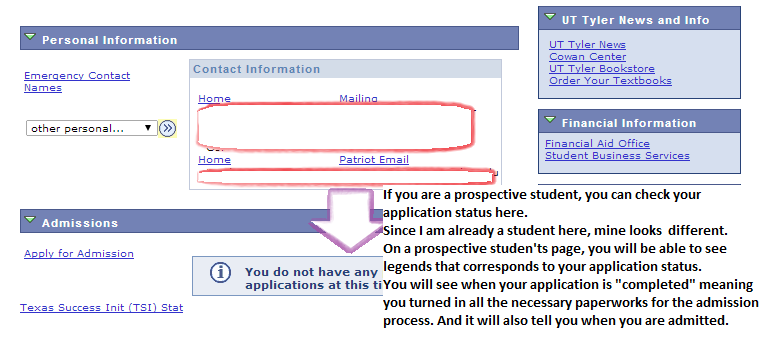
Navigating myUTTyler

    myUTTyler is a great tool for both prospective and admitted UT Tyler students! I know it can be hard for students who have never navigated through myUTTyler to find the student center, which basically where you will spend a majority of your time when using myUTTyler.

1. Go to the UT Tyler website and hover over UT Tyler log in. Click on myUTTyler.

*If you do not remember your credentials, you can contact IT Support at 903-565-555 or IT@uttyler.edu.

2. Click on Student Home Page on the left hand side
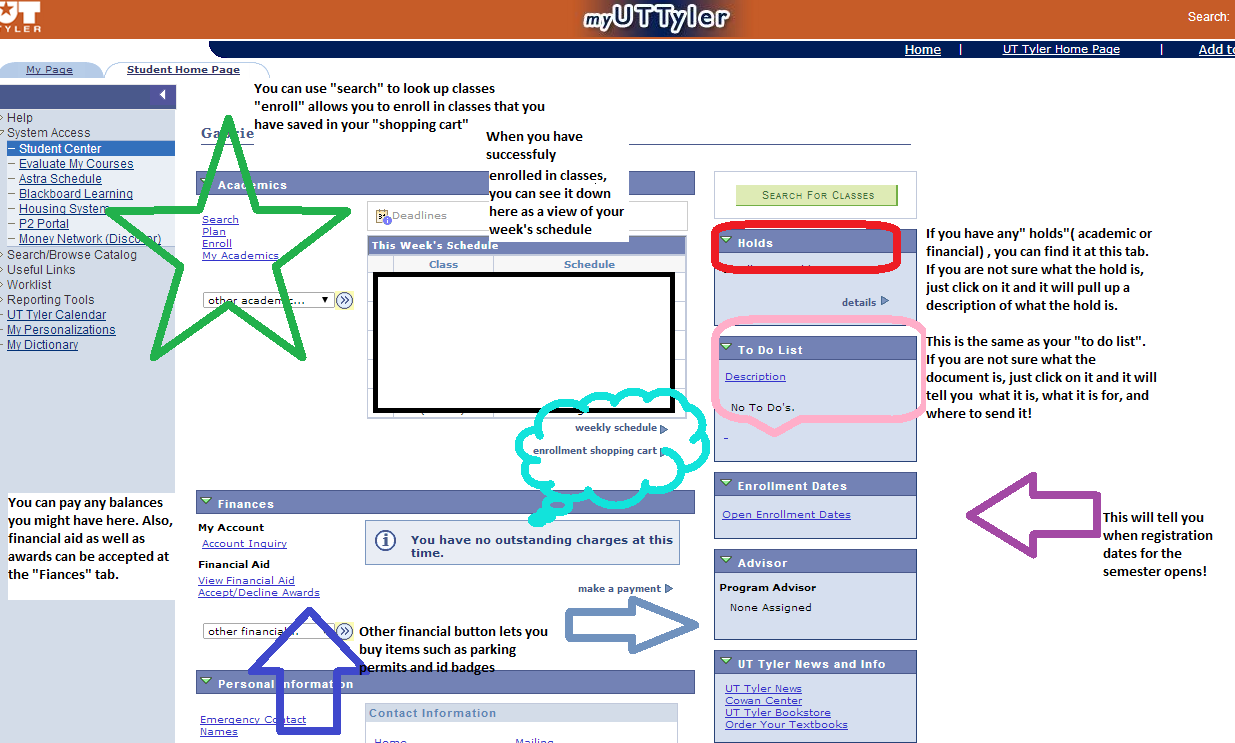
3. Click on student center and that's where all the magic happens.


Click image to enlarge

click image to enlarge 
I HOPE THIS HELPS! Also, check out Keerin's blog on enrollment "to do list"

Wednesday, November 27, 2013

Course Evaluations!


 With the semester coming to a close, the time to fill out course evaluations is upon us. They've added a bit of incentive this year, you get a chance of winning one of three iPad Mini's. Now you're a bit excited about filling out course evaluations 
right?
I am right there with you, as I have to give back my school iPad and the horizons look dull, as none of the classes I am taking next semester are one of those iPad assisted classes!

So here are the details: 
  • The myUTTyler Online Course Evaluation System will open at 12:01 a.m., Monday, November 25, 2013. 
  • Instructions and access to the evaluation system are displayed in the “Student Training” box on the Student Home Page of myUTTyler.
  • Once logged into myUTTyler, students access the evaluation system by clicking this Evaluate My Courses link.  A similar link can be found in the Notifications box in myUTTyler.
  • In appreciation for completing evaluations before the deadline, the university will grant respondents “priority access” to view their semester grades one week earlier than non-respondents.
  • Students who complete course evaluations will have access to grades on myUTTyler beginning at12:01 a.m. Thursday, December 19, 2013.   Additionally, they will be entered into a prize drawing for 3 mini iPads.
  • Students who do not complete course evaluations by the end of the day December 6 must wait until 12:01 a.m. Wednesday, December 25, 2013 to have access to grades through either myUTTyler or Blackboard.
      I got all this information(except for the screenshot, I did that myself) from the school website, at this link.  So, let's all take the time to fill out these evaluations!


Tuesday, November 12, 2013

UT Tyler Spring 2014 Classes

Registration for classes for next semester began on November 1st. Registration is open to everyone and if you haven't already made your schedule, please do!
 If you need help navigating myUTTyler, Emmy made a blog post about it to guide you. If you haven't spoken to your advisor about your schedule and your degree plan, make an appointment.

Some students self-advise after their freshman year when they're required to go to a freshman advisor, but it's in your best interest to go see your advisor to make sure that you're on track. Your advisor can also give you the schedule of classes that your department is going to be teaching the following semester.

For our students that have applied for next spring, get an appointment with an advisor as soon as possible. The quicker you can get registered, the better chance you have at getting a schedule with the times you want and having to change your schedule around because some classes are closed.

The less classes you have left to finish your degree plan, the more registering is like The Hunger Games.

REGISTER FOR YOUR  SENIOR REQUIREMENTS
I had to take a research methods class last year as a senior requirement and as soon as I was able to register, I enrolled into it. Those are the kinds of classes that fill up quickly; I asked a classmate that was a year below me and he couldn't register the day after because the class was already closed. 

Get the hang of enrolling in classes and learn how to navigate myUTTyler like the back of your hand. You are going to need that skill when you're almost done with your undergrad career. 

Tuesday, August 20, 2013

What to do with your financial aid refund

On August 16th, the financial aid award packages were added to our tuition bills. Everyone that was expecting financial aid was anxious.


If you haven't checked and made sure your myUTTyler account shows all the awards you have accepted on your account, you should do that and follow up if you think there's been an error.
Aw yiss! Payments made!


It is a wonderful sight
Beginning August 30th, any remaining aid money that didn't pay for your tuition will be refunded to you. Once you see you have extra money, a million things you could do with it will cross your mind. So what shall you do with this gift?

1. Buy a car.
If you haven't bought a car and don't live within walking distance of campus, this is your opportunity to buy a car. If you have a decent income from your part-time job, the amount from your financial aid package will be a good sum for a down payment. Shop around to make sure you have a good deal.

Take a parent or a friend you completely trust with cars and test drive different models. Ask around to find out where the best deal on car insurance is.  Remember that you're going to pay for more than just the car itself: title, inspection, registration and insurance will be an added cost. Also, gas, oil changes, tires and any kind of repairs should be expected.

If you already have a car, but are constantly having issues with it, trade it in and give an extra payment with your refund. Get something more fuel efficient, with more seats (carpool and ask your friends to help you out with gas every so often) and safer (your insurance is cheaper with a more safe vehicle than, say, a sports car) to save some money.

2. Give to a charity
Find out what it is that you want to change and find the (reputable) charity that does that. Once you donate, you get a feeling of goodwill (those warm fuzzies) and if you have a job and have to report your taxes, the donation is tax-deductible!

3. Buy a bicycle
If you live on campus or you just want to cut the time it takes you to walk between your classes and get a good workout out of it, then buy a bike.

There's tons of bikes on campus and almost every single building has a bike rack at the entrance. It improves your health, takes less time, and you won't be tempted to drive from one building to another (and waste gas in the process).

4. Save!
If you want to put your money away for a rainy day, put it into a savings account. Shop around both online and at local branches. Compare the advantages and benefits each give you.

Look at the fine print and make sure you won't be charged for things you weren't aware of. Make sure there aren't any penalties for withdrawing money because you're saving for an emergency or when your own funds fall short during the semester.

If you want to put that money away for a long time, think about putting it into a Roth IRA. It'll eventually grow (with some help from your income) into a good sum for your retirement. It's something to think about if you want your money to be put to good use and you're sure you won't need it anytime soon. We aren't going to be young forever, you know.

5. Buy an ice cream truck

If you want to be the cool kid on the block and always have a stash of ice cream, this is for you. It will be summer year-round! It's a great ice breaker and you'll be the most well known person for miles.

Okay, don't do this. I'm not telling you what to do; if you really want an ice cream truck, I can't stop you. But, seriously, don't do this. 


Christmas comes early for those of us that receive financial aid refunds and the endless opportunities that come with that refund are always a cause for celebration. Be smart with your money and remember that later in the semester, you might need it (but don't just stash it in your sock drawer).

What are you going to do with your financial aid refund? 

Monday, April 29, 2013

Before School Ends Checklist

The end of the semester is fast approaching and I know we all look over stuff when there are a BILLION things to do and get done. So this is just a friendly reminder to do these two things before school ends!

 Do your course evaluation!
1. log on to your myUTTYLER
2. go to your student center


3. click on evaluate my course
If you do this, you will receive your grades EARLIER on May 16th and be put in a drawing for an Ipad mini!


Check your to do list!
It is on the other side of the page on Student Center

If you have SCHOLARSHIP for the SUMMER TERM be sure to write your letter of appreciation so it can be disbursed to you! Along with all the things under your to do list. If you do not do this then you can loose the scholarship :( sad day

If tax transcript is listed under your to do list all you have to do is..
1. go to IRS.gov
2. click "order a return or account transcript"
3. log in with your credentials ( you will need your social for this!)
4. Also if you are a dependent (meaning you are still under your parents) they would need their credentials and order another transcript for them as well
6. Remember to choose the option for  return transcript and NOT account transcript! 
 It takes 5-10 days for this to be mailed at your permanent address so plan ahead if you are only living at Tyler for college. You would need to plan on how to get that mail and turn it in to the One Stop Shop since they will send it to your HOME ADDRESS! 

Obviously there are more things that could be on your to do list but the tax transcript as well as the scholarships are the most common ones to be on it. Just remember to try and make time to do this just so you don't have to come back up to the campus and worry about it during the summer :)


Wednesday, April 24, 2013

Course Evaluations!

I just want to remind all the students here at UT Tyler to do a course evaluation online. You can find the course evaluation on your “myuttyler” account under student home page and then "system access". This is very important for each and every department because it gives the professors an opportunity to recognize their performance from a student point of view! It’s completely anonymous, but the head of the department gets to review those and make their department even better.
Some of the advantages from doing a course evaluation online are that the student gets to see their grades earlier than the students who don’t take the time to do the evaluation. Everyone will have till May 6th to finish up their course evaluation online and then be able to see their grades starting May 16. The others who don't complete the evaluation have to wait until May 22! Everyone wants early access to your grades! Also, when you're taking the evaluation, here are two pointer to make sure its submitted correctly:

- Make sure you get a congratulations message on the screen - only then will you be completely finished!
- Be sure to answer all questions for each class. The Submit button will not work if any questions are missed!
.
Another reminder to end this semester smoothly is that students need to make sure and look at the final's schedule online! You don’t want to miss your final by not getting to class on time or don’t want any confusion on when and what time your each final will be held. Since everyone worked so hard to maintain a great semester, take this opportunity to organize yourself with the final schedule.
Plan your schedule accordingly since finals are just a week away!
Avoid last minute hassle!
Be on time!
Study hard!
And Good Luck everyone!

Tuesday, July 31, 2012

Are You Ready For This Semester?

Today is the last day of July which means in 20 days the 2012 Fall semester will begin at UT Tyler. You've probably been lounging about for the past 2 months (except for those taking summer courses) and have even forgotten what you signed up for. Well, here's a short check list to help you prepare for the coming semester.

Have you paid your tuition and/or other bills that may put holds on your account?

Be sure and check your myuttyler account prior to the start of classes to make sure you have no fees or fines that may impede you in any way. You can also pay any outstanding bills via the cashier's office.

Do you have all your school supplies in order?

Be sure to bring at least a pen/pencil and a few sheets of loose leaf paper as some of your professors may want you to take notes on the very first day. HOWEVER, it is best to wait until after your first class to get any books for your classes. Some of your professors will not make them required or will base the entire class off their lectures alone. The syllabus may say the book is part of the class but the professor may say something different.

Is your home clean?

Before any semester begins I like to thoroughly clean my entire apartment to make at least the first week or so of classes stress free. However, this will change as the semester goes on and all my time begins to be engulfed by school work.

Do you have a parking sticker/permit?

Parking stickers can be paid for at the cashier's office and then picked up at the University Police Station with your receipt. For more info you can check out my this post which talks about where to park on campus and this one which explains how to go about getting a parking sticker/permit for this upcoming semester.

With this general outline your preparations for the upcoming semester should be most enjoyable and be completed with the greatest of ease

Life Cheat #84710: water taste a little... not so good? Simply put a slice of cucumber in their to instantly give your water a fresher taste.